
FuturePBX Insights
Never let a missed call become a missed opportunity.
See what happened, identify who still needs attention and understand how quickly your team responds - all in one simple view.
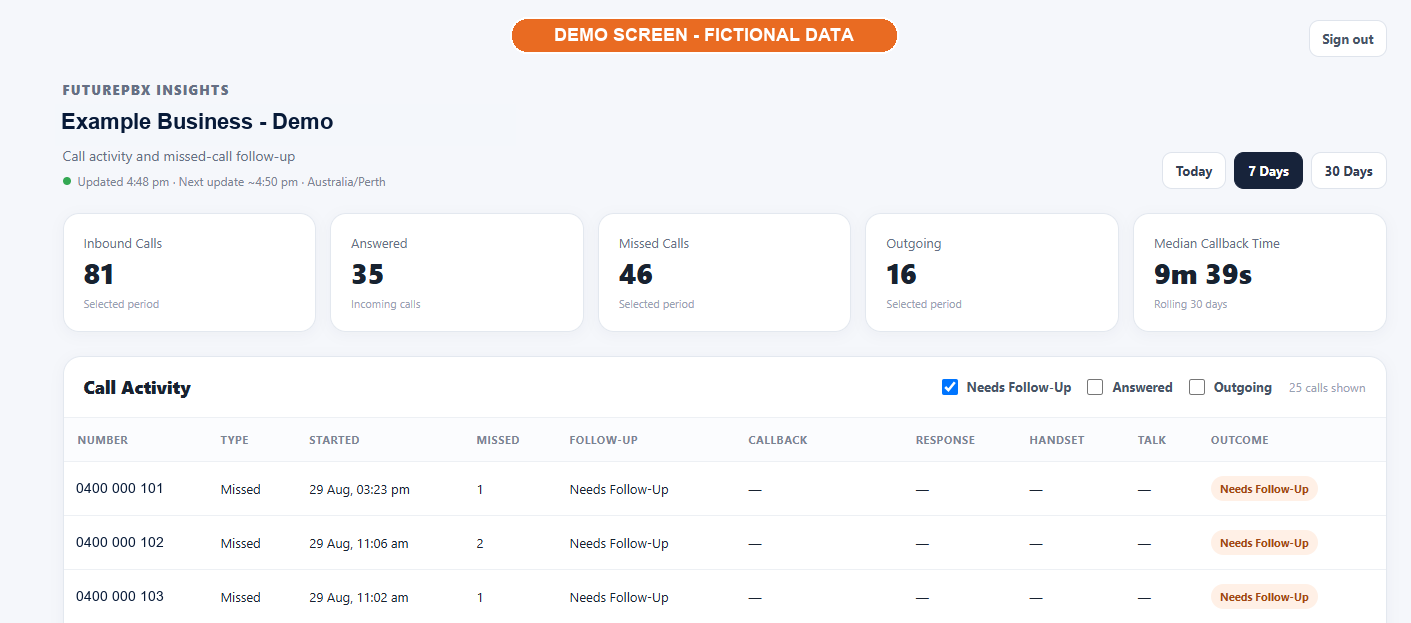
Demonstration screen. Business details and phone numbers are fictional.
A clearer daily picture
Built for action, not administration
FuturePBX Insights turns everyday phone activity into a practical working view, helping your team focus on the callers who may still be waiting.
See every call
Get a clear view of inbound, answered, missed and outgoing calls for Today, 7 Days or 30 Days.
Prioritise follow-up
Start with a working list of missed callers who have not yet been successfully contacted.
Understand response
See typical callback time and follow-up outcomes without creating or refreshing manual reports.
Missed calls made useful
Know the difference between what was missed and what still needs attention
Missed Calls shows every incoming call that was not answered when it first came in, even if the caller was contacted later.
Needs Follow-Up gives your team a practical list of callers who have not yet been successfully contacted. Multiple calls from the same number may be grouped together so the list stays focused.
Follow-up statuses update automatically
The caller has not yet been successfully contacted.
An outgoing attempt has been made, but a connection has not yet occurred.
The caller has subsequently been successfully contacted.
Staff do not need to manually mark calls as completed. Insights follows your FuturePBX phone activity for you.
Useful at a glance
The call detail your team needs
Filter the activity list and quickly understand what happened without digging through phone-system reports.
Automatic updates
Information refreshes approximately every five minutes and updates when you return to the browser tab.
Flexible filters
View Needs Follow-Up, Answered and Outgoing activity separately or together.
Callback visibility
See callback and response times where they are available.
Handset detail
Identify the handset and extension that answered a call where available.
Talk time
Review talk time alongside the call outcome.
Secure access
Each portal user signs in with an individual account and can reset a forgotten password.
FuturePBX customers
Turn call activity into timely follow-up.
Talk to Future Technologies about adding Insights to your FuturePBX service.